
Can AI Really Fix a Blurry Face? Here’s What Works
By Maria · 2026-09-01
Learn how AI can fix a blurry face, when face enhancement works best, what AI may reconstruct, and how to unblur a face without making it look fake
You take a group photo, scan an old family picture, or receive an image that has been compressed several times. Most of the photo still looks acceptable, but one face is noticeably soft, blurred, or lacking detail. At that point, the question is not simply how to make the image sharper. The real question is whether AI can actually recover the missing facial detail or only create a more convincing version of what it thinks should be there.
In many cases, AI can enhance a blurry face surprisingly well. If the original image still contains enough visible structure around the eyes, nose, mouth, and overall face shape, modern enhancement tools can improve sharpness, restore clearer edges, and make the face look much more usable. This is where techniques such as AI face unblur and face super resolution can make a noticeable difference.
But there is an important limit. AI cannot recover details that were never captured in the first place. When a face is heavily blurred, extremely small, or badly compressed, the tool has less real information to work with. The result may still look sharper and more realistic, but it becomes partly a reconstruction rather than an exact recovery of the original face.
So, can AI really fix a blurry face? Often, yes—but how well it works depends on what caused the blur, how much facial information remains, and how carefully the enhancement is applied.
Summary
AI can significantly improve many blurry faces, but the quality of the result depends on how much useful facial information remains in the original image. Mild softness, compression, and low resolution are often good candidates for AI face enhancement , while heavily blurred or extremely small faces require more reconstruction. The key is to choose the right tool, compare the enhanced image carefully with the original, and remember that a sharper face is not automatically a more accurate one.
Before You Fix the Face, Find Out What Kind of Blur You Have
A blurry face is not always caused by the same problem. One photo may be slightly out of focus, while another may suffer from motion blur, compression, or simply too few pixels. That difference matters because AI does not fix every type of blur equally well.
Use the visual clues below to identify what is most likely happening before you try to unblur a face.
What You See | Likely Problem | How Well AI Usually Helps | Best Starting Approach |
|---|---|---|---|
Face looks slightly soft | Mild missed focus | High potential | Face enhancement or sharpening |
Edges have a directional streak | Camera shake or subject movement | Depends on severity | Deblur or motion correction |
Face looks blocky or pixelated | Low resolution | Often good visually | Face enhancement + face super resolution |
Skin and features look smeared | Compression | Often improvable | Face enhancement + artifact reduction |
Face is tiny in a group photo | Too few facial pixels | Limited to moderate | Face recovery or super-resolution |
Face is almost unrecognizable | Severe information loss | Low fidelity | Generative reconstruction may only estimate missing details |
Camera shake can blur the whole image when the camera moves during exposure, while subject movement can create streaking around the person even if the background stays relatively sharp. Missed focus produces a softer, less detailed face without necessarily creating visible motion trails. Adobe also lists camera movement as a common reason an otherwise usable photograph can appear blurry.
Compression causes a different problem. Instead of simple softness, facial details may look smeared, blocky, or uneven because image data has been discarded. Low resolution creates a similar limitation for AI: when a face contains very few pixels, there is less real information available to enhance.
This is why asking only, “How can I unblur a face?” can be misleading. The better question is what information the image still contains. If the main facial structure is visible, AI may be able to enhance the blurry face while staying reasonably close to the original. If most of that structure has disappeared, the tool has to estimate more of the result.
What Is AI Actually Doing When It “Fixes” a Face?
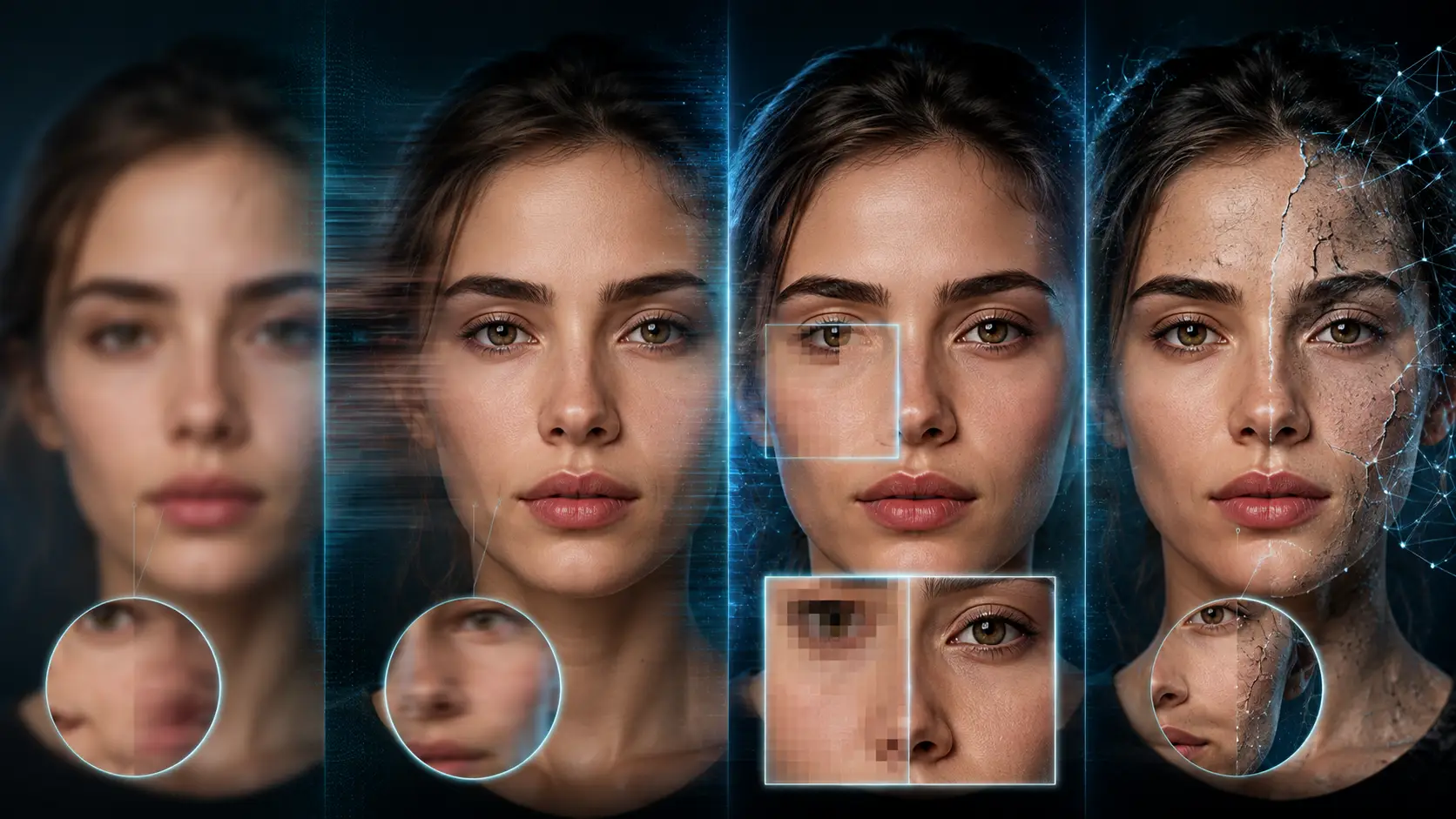
When you use AI to fix a blurry face, the software is not performing one single operation. Depending on the condition of the image, it may sharpen existing details, reduce blur, increase resolution, or reconstruct facial features that are no longer clearly visible.
The important point is that these processes are not the same.
Sharpening
Sharpening works mainly with information that is already present in the photo. It increases contrast around visible edges, which can make features such as the eyes, lips, eyebrows, and outline of the face appear clearer.
It works best when the face is only slightly soft. If important facial details are already missing, sharpening alone cannot bring them back and may simply make noise or artifacts more noticeable.
Deblurring
Deblurring tries to reduce distortion caused by problems such as camera movement, subject movement, or missed focus.
For example, if someone moved slightly while the photo was taken, an AI deblurring system may analyze the direction and pattern of that blur and attempt to produce cleaner facial edges. The better the remaining structure of the face, the more useful this process can be.
Super-Resolution
Face super resolution approaches the problem differently. Instead of only sharpening the existing pixels, it creates a higher-resolution representation of a low-resolution face.
This can be especially useful when a face looks pixelated or occupies only a small part of an image. AI examines the available facial structure and predicts how a higher-resolution version could look.
However, increasing resolution does not automatically mean recovering the exact original detail. A larger and cleaner-looking image can still contain details that were estimated by the model.
Generative Face Restoration
This is where AI face unblur becomes more complicated.
When an image is heavily degraded and does not contain enough information to clearly define features such as eyelashes, skin texture, or the exact shape of the mouth, generative restoration models can use patterns learned from large numbers of faces to reconstruct plausible details.
Researchers behind CodeFormer describe blind face restoration as a “highly ill-posed problem.” In simple terms, one badly degraded image can correspond to several possible sharp-looking faces, so there may be no single perfect answer that can be recovered from the input alone.
Research behind GFP-GAN highlights the same limitation from another angle: very low-quality images may not contain sufficiently accurate facial geometry to guide the restoration process. Its generative facial prior therefore helps supply realistic facial detail when the original image provides too little information.
A simple way to think about it is this:
AI is closer to completing a partially erased drawing using everything it has learned about faces than opening a hidden layer that contains the missing pixels.
That distinction matters. If you enhance a blurry face and the original still contains clear facial structure, the result can remain relatively faithful to the person. But as more information disappears, the AI has to make more decisions on its own.
So AI enhancement is not the same as retrieving hidden pixels from the original scene. Sometimes it improves what is already there. Sometimes it estimates what is missing. The stronger the blur or degradation, the more important that difference becomes.
Clearer Does Not Always Mean More Accurate
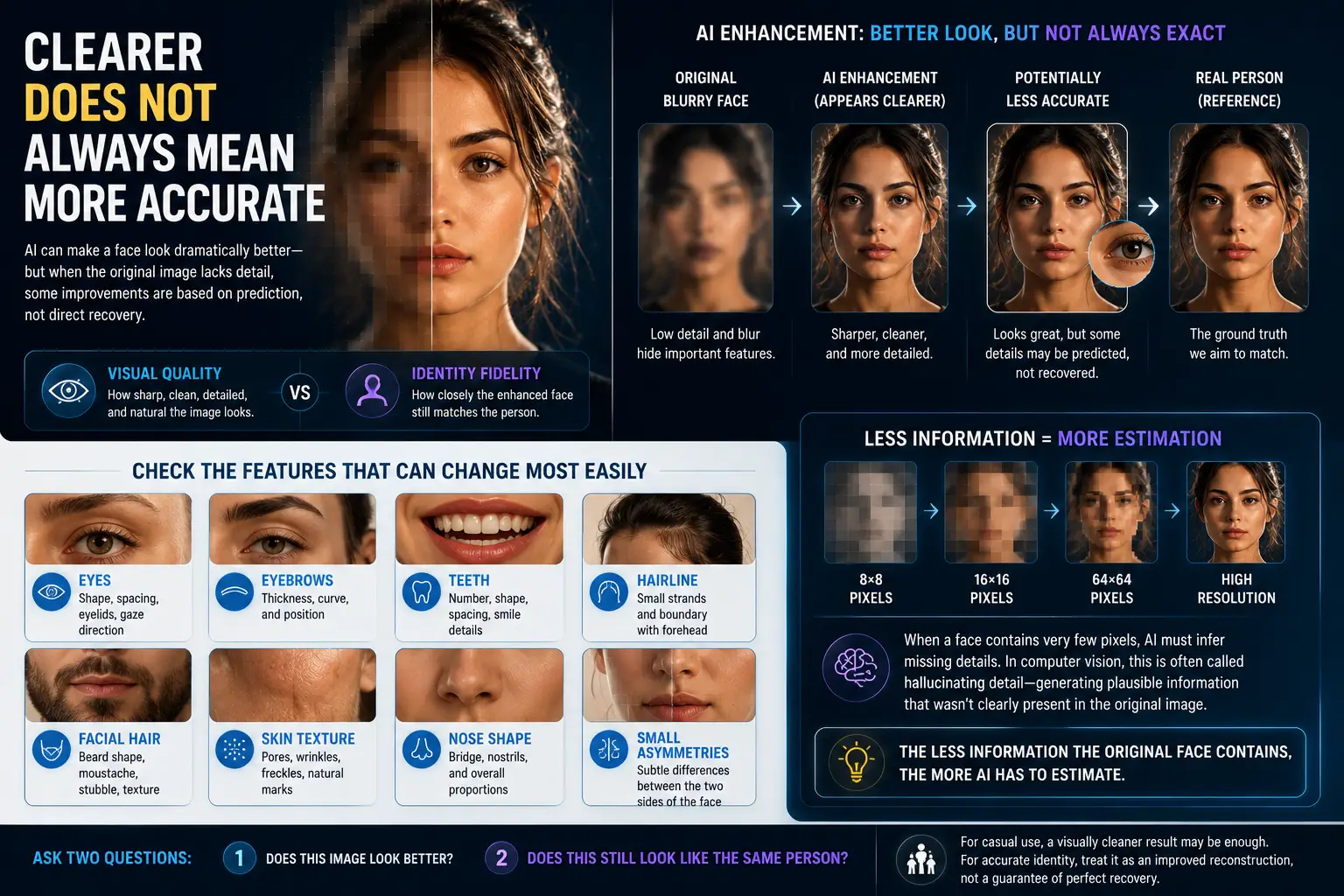
A face can look dramatically better after AI enhancement and still be slightly less faithful to the real person.
That is because two different things are being judged at the same time:
Visual quality — how sharp, clean, detailed, and natural the image looks
Identity fidelity — how closely the enhanced face still matches the person in the original photo
AI can improve visual quality very effectively. It can make the eyes clearer, define the edges of the face, smooth compression artifacts, and create more natural-looking skin or hair. But when the original image does not contain enough detail, some of those improvements may be based on prediction rather than direct recovery.
This is especially important with very small or heavily blurred faces.
Face super-resolution research has shown that a low-resolution facial area can correspond to more than one plausible high-resolution version. In other words, the available pixels may not provide enough information to determine exactly what the missing details should look like. As a result, a restored face may appear convincing while introducing small changes to facial features.
The problem becomes even more obvious when a face contains only a tiny number of pixels, such as an 8×8 or 16×16-pixel crop. At that size, fine information such as eyelashes, skin texture, individual hairs, and subtle facial contours is no longer directly available. AI has to infer some of it.
In computer vision research, this is sometimes described as hallucinating detail. The term simply means that the system generates plausible high-resolution information that was not clearly present in the original image.
For a general user, there is an easier rule to remember:
The less information the original face contains, the more AI has to estimate.
Check the Features That Can Change Most Easily
When you use AI to unblur a face, do not judge the result only by whether it looks sharper. Compare it carefully with the original, especially around details that strongly affect identity.
Pay attention to:
Eyes: shape, spacing, eyelids, and gaze direction
Eyebrows: thickness, curve, and position
Teeth: number, shape, spacing, and smile details
Hairline: small strands and the boundary between hair and forehead
Facial hair: beard shape, moustache, stubble, and fine texture
Skin texture: pores, wrinkles, freckles, and natural marks
Nose shape: bridge, nostrils, and overall proportions
Small asymmetries: subtle differences between the two sides of the face
These details can appear sharper after enhancement without necessarily being exact.
A useful way to judge the result is to ask two separate questions:
Does this image look better?
and
Does this still look like the same person?
For casual uses such as improving a family photo, social image, or old portrait, a visually cleaner result may be enough. But when accurate identity matters, especially with a very blurry or extremely low-resolution source, a sharper face should be treated as an improved reconstruction—not automatic proof that every facial detail has been recovered correctly.
Face Enhance, Sharpen, Upscale or Restore? Pick the Right Tool
Not every photo problem needs the same fix. A common mistake is to use sharpening, upscaling, restoration, and face enhancement as if they all do the same job.
They do not.
The best starting point depends on what is actually wrong with the image.
Your Problem | Best Starting Tool | Why |
|---|---|---|
The face itself is blurry or poorly defined | AI Face Enhance | Focuses specifically on improving facial features and portrait detail |
The photo is only slightly soft | Sharpen | Strengthens edge definition that is already visible |
The face is recognizable but very small | AI Upscaler | Increases resolution so the image can be enlarged more cleanly |
An old photo has scratches, fading, or physical damage | Photo Restoration | Targets age-related damage rather than blur alone |
The entire image looks noisy or heavily compressed | General Image Enhancer | Improves broader image quality instead of concentrating only on the face |
When AI Face Enhance Makes the Most Sense
If the main problem is the face itself—soft eyes, unclear facial features, compression around the skin, or a generally low-quality portrait—a dedicated face-enhancement tool is usually the most logical place to start.
For example, Betatum AI Face Enhance is designed specifically for blurry, compressed, and low-quality portraits. That makes it more relevant than applying a general sharpening filter to the entire image when the face is the part that needs attention.
This distinction matters because aggressive sharpening can make an image look harsher without actually improving important facial details. A face-focused model is instead designed to recognize facial structure and concentrate its processing where it matters most.
When Sharpening Is Enough
You do not always need AI reconstruction.
If a face is already clear and only looks slightly soft, ordinary sharpening may be the safer choice. It works with the edges already present in the image rather than attempting to create substantially more facial detail.
Think of sharpening as polishing what is already there. It can improve definition, but it is not designed to rebuild a heavily blurred face.
When Upscaling Helps More Than Face Enhancement
Upscaling solves a different problem: size and resolution.
Suppose the face is reasonably clear, but it occupies only a small portion of the photo. In that case, the priority may be increasing the resolution so you can enlarge the image without making it immediately look blocky or pixelated.
An AI Photo Upscaler is more appropriate here. Betatum, for example, supports image upscaling up to 8×, which can be useful when enlargement is part of the problem.
But upscaling should not automatically be treated as a way to unblur a face. Making an image larger and making an unclear face more accurate are two different tasks. If the source face is both tiny and blurry, a combination of face enhancement and super-resolution may be more appropriate.
Restoration Is for a Different Kind of Damage
An old family photograph may look unclear for reasons that have little to do with camera focus. Scratches, faded contrast, stains, creases, and age-related deterioration require a restoration workflow.
Photo restoration is designed to repair those broader defects. Once the damaged image has been cleaned up, face enhancement may still be useful if the portrait itself remains soft.
The simplest rule is:
Choose the tool that matches the problem, not the tool with the most impressive-sounding name.
If the face is blurry, start with face enhancement. If it is merely soft, try sharpening. If it is too small, upscale it. If the photograph is faded, scratched, torn, or physically damaged, an AI Photo Restoration tool may be the better place to start. Matching the method to the source image usually produces a more natural result—and reduces the amount of unnecessary AI reconstruction.
How to Fix a Blurry Face With AI Without Making It Look Fake
If you want to fix a blurry face with AI, the goal should be better clarity without changing the person’s natural appearance.
1. Start With the Highest-Quality Version
Use the original photo whenever possible. Screenshots, social-media downloads, and compressed copies contain less facial detail and give AI less accurate information to work with.
2. Use an AI Face Enhancer
Upload the image to a face-focused tool such as Betatum AI Face Enhance, which is designed for blurry, compressed, and low-quality faces.
AI can reconstruct and enhance plausible facial detail, but it does not recover exact pixels that were lost from the original image.
3. Compare the Result at 100%
Do not judge the result only from a small before-and-after preview. Zoom in and check the:
eyes,
mouth,
teeth,
skin texture,
hairline.
Make sure the face still looks like the same person.
4. Reduce the Effect if It Looks Artificial
More enhancement does not always produce a better result.
If the skin looks too smooth, the eyes become unnaturally sharp, or facial details start changing, use a lighter enhancement. Face-recovery tools can over-process images that already contain enough detail.
A slightly softer but accurate face is usually better than a very sharp face that looks artificial.
5. Upscale Only If You Need a Larger Image
Upscaling is not necessary for every blurry photo.
If the face looks good but the image is still too small for printing, cropping, or high-resolution use, then apply an AI upscaler. Otherwise, face enhancement alone may be enough.
The best workflow is simple: use the best original, enhance carefully, inspect the face, and stop before the result looks over-processed.
How Do You Know the AI Actually Improved the Face?
Do not ask only, “Is the face sharper?”
Ask instead:
“Is it sharper while still looking like the same person?”
Use this quick quality-control checklist before accepting the result:
Do both eyes still have their original shape?
Has the smile or mouth shape changed?
Did the AI create unusually perfect or different-looking teeth?
Has the nose become narrower, wider, or differently shaped?
Does the skin look unnaturally smooth?
Have the eyebrows, beard, moustache, or stubble changed?
Do any hair strands look artificial or misplaced?
Are glasses, earrings, or other small details distorted?
Does the face look much sharper than the neck, hair, or rest of the body?
Most importantly, does the person still look recognizably the same?
This matters because face restoration becomes less reliable when the source image contains too little usable detail. Topaz also warns that face recovery can produce unrealistic artifacts when there is not enough facial information for the model to work from accurately.
A successful AI face unblur should therefore improve clarity without unnecessarily changing identity. If the result looks cleaner but several facial features have shifted, it may be visually impressive but it is not necessarily a better restoration.
When Is a Blurry Face Too Far Gone?
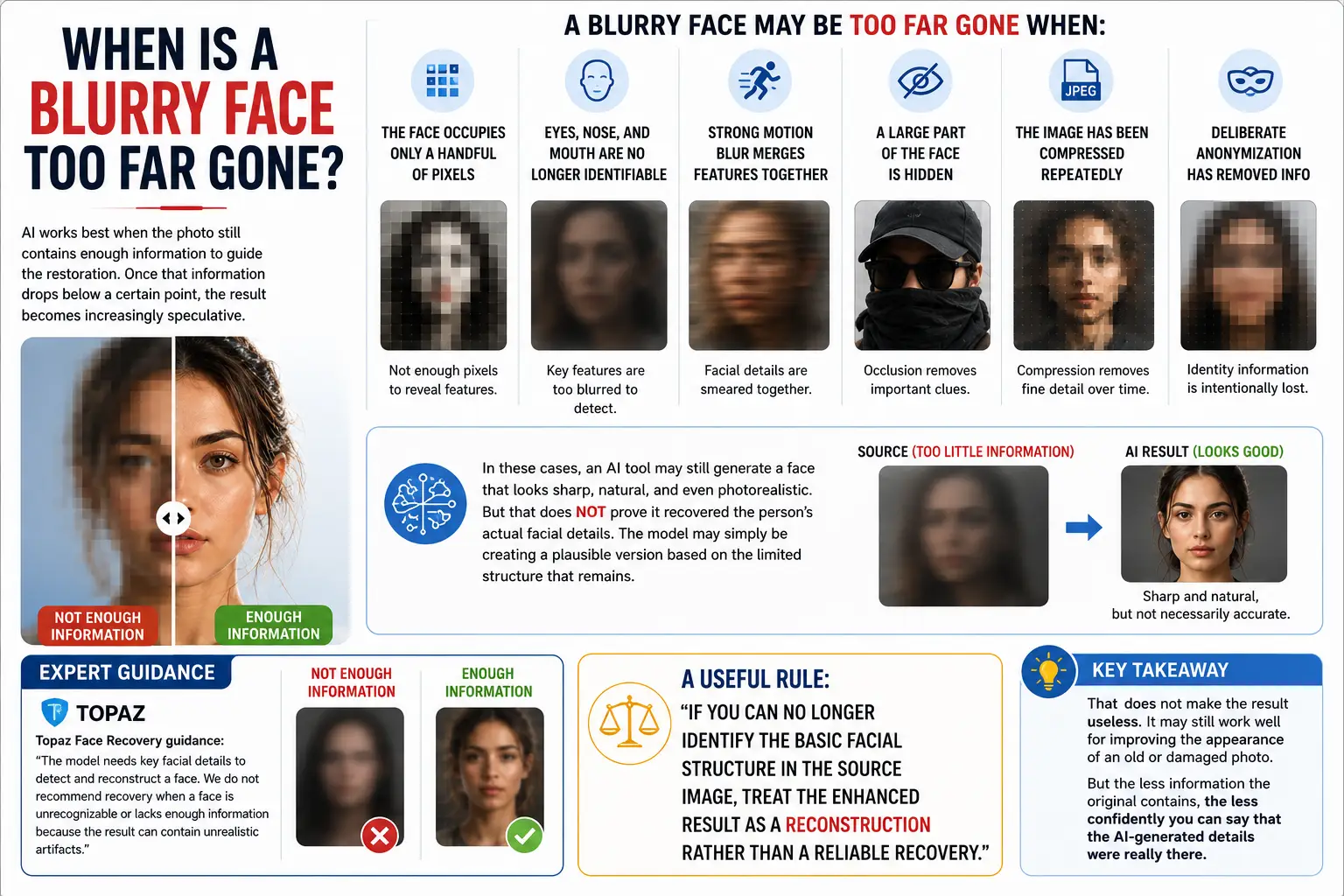
AI works best when the photo still contains enough information to guide the restoration. Once that information drops below a certain point, the result becomes increasingly speculative.
A blurry face may be too far gone when:
the face occupies only a handful of pixels,
the eyes, nose, and mouth are no longer clearly identifiable,
strong motion blur has merged facial features together,
a large part of the face is hidden,
the image has been compressed repeatedly,
or deliberate anonymization has removed identifying information.
In these cases, an AI tool may still generate a face that looks sharp, natural, and even photorealistic. But that does not prove it recovered the person’s actual facial details.
The model may simply be creating a plausible version based on the limited structure that remains.
Topaz makes a similar distinction in its current Face Recovery guidance. It states that the model needs key facial details to detect and reconstruct a face, and recommends against recovery when a face is unrecognizable or lacks enough information because the result can contain unrealistic artifacts.
A useful rule is:
If you can no longer identify the basic facial structure in the source image, treat the enhanced result as a reconstruction rather than a reliable recovery.
That does not make the result useless. It may still work well for improving the appearance of an old or damaged photo. But the less information the original contains, the less confidently you can say that the AI-generated details were really there.
A Better Result Depends on What You Need the Photo For
There is no single “best” level of AI enhancement. The right amount depends on what you plan to do with the image.
Use Case | What Matters Most | How Much AI Reconstruction Is Acceptable? |
|---|---|---|
Social media | Natural appearance | Usually moderate |
Profile picture | Identity + clarity | Low to moderate |
Family memory | Resemblance | Conservative enhancement preferred |
Old photo restoration | Natural reconstruction | Moderate, but keep the original |
Printing | Resolution + natural detail | Enhancement + upscaling may help |
Documentary or historical use | Accuracy | Be conservative |
Legal or forensic use | Evidentiary accuracy | Generative reconstruction should not be treated as recovered fact |
For a social post, a slightly reconstructed but natural-looking face may be perfectly acceptable. For a family photograph, preserving resemblance may matter more than achieving maximum sharpness. If the goal is printing, face enhancement and upscaling can also work together when both facial clarity and output resolution need improvement.
The standard should become much stricter when the image is being used to document history, identify someone, support analysis, or serve as evidence.
NIST defines image enhancement as a process intended to improve the visual appearance of an image or features within it. That definition is important: making something easier to see is not the same as proving that newly visible-looking detail existed in the original scene.
Forensic imaging guidance follows the same cautious approach. It emphasizes preserving the original image and documenting enhancement steps so that the processing can be reviewed and, where necessary, reproduced.
For any high-stakes use, keep the untouched original alongside the enhanced version. An AI-generated detail may look convincing, but it should not be presented as recovered fact when the source image did not clearly contain that information.
So, Can AI Really Fix a Blurry Face?
Yes, AI can often make a blurry face significantly clearer, especially when the main facial structure is still visible. But the word “fix” has limits. AI can improve softness, compression, and low-resolution detail, yet it cannot perfectly recover information that was never captured. If the face is only mildly blurred, the result can stay quite faithful to the original. If the face is extremely small, heavily blurred, or missing key features, the AI has to estimate more of what it shows.
The best results come from treating AI enhancement as restoration, not magic. Use the highest-quality source you have, compare the result carefully, and pay attention to whether the person still looks recognizably the same.
If you want to improve a blurry, compressed, or low-quality portrait, Betatum AI Face Enhance is a practical place to start.